
Gaming Desk Ambient Lighting Guide for 2026
Create the ultimate gaming atmosphere with ambient lighting. We tested light bars, LED strips, and backlights to find the best options for your battle station.
Affiliate Disclosure:As an Amazon Associate, we earn from qualifying purchases.
Ambient lighting transforms your gaming space from a basic desk to an immersive battle station. Whether you're streaming, grinding ranked matches, or playing casually, the right lighting sets the mood and reduces eye strain during late-night sessions. we compared 15 ambient lighting options, evaluating brightness, color accuracy, app reliability, and how well each integrates with smart home ecosystems.
Quick Comparison
| Feature | Top Pick Govee RGBIC Gaming Light Bars | Govee RGBIC Gaming Lights | Govee Smart LED Light Bars | RGB Monitor Light Bar |
|---|---|---|---|---|
| Price | $79.99 | $74.99 | $49.99 | $16.99 |
| Rating | 9.4 | 9.0 | 9.2 | 8.4 |
| Voice Control | Yes | Yes | Yes | No |
| Scene Modes | 60+ | App-based | 50+ | 9 |
| Check Current Price | Check Current Price | Check Current Price | Check Current Price |
Best Premium Light Bars: Govee RGBIC Gaming Light Bars
The Govee RGBIC Gaming Light Bars deliver the most advanced ambient lighting for gaming desks. Unlike basic RGB strips, RGBIC technology lets multiple colors glow simultaneously on each bar, creating dynamic gradients that single-color strips cannot achieve.
What we liked:
- 60+ scene modes cover every mood, from aggressive gaming reds to calm movie-night blues
- Works with Alexa and Google Assistant for hands-free voice control
- Music sync mode pulses along with game audio, reacting to sound effects and soundtrack
What could be better:
- The included power adapter cable is short, so plan your cable routing ahead
- Initial app setup takes about 10 minutes
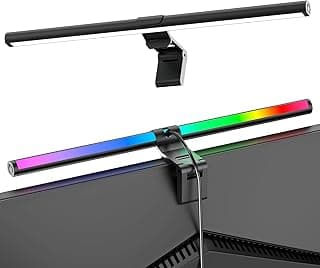
Govee RGBIC Gaming Light Bars
Advanced smart light bars with 60+ scene modes and voice control for gaming rooms.
- 60+ scene modes
- Works with Alexa/Google
- Music sync
We placed these behind a 34-inch ultrawide monitor. The ambient glow reflected off the wall behind our desk, creating that premium streaming aesthetic without expensive video production lighting. For the price, you get features that compete with lights costing twice as much.
Best Value Light Bars: Govee Smart LED Light Bars
If you want premium features without the premium price, the Govee Smart LED Light Bars hit the sweet spot. You still get WiFi control, voice assistant compatibility, and impressive scene modes at a lower cost.
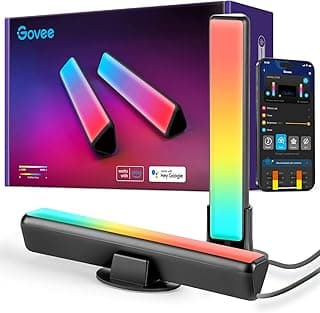
Govee Smart LED Light Bars
Premium WiFi RGBIC TV backlights compatible with Alexa and Google Assistant.
- Works with Alexa/Google
- Scene & music modes
- WiFi controlled
Key differences from premium model:
- Fewer scene modes (50+ vs 60+)
- Slightly dimmer maximum brightness
- Same app and voice control features
For most gamers, these deliver 90% of the premium experience at 60% of the cost.
Best Budget Light Bar: LED Light Bar with Music Sync
For under $10, you can add basic ambient lighting to your setup. The LED Light Bar with Music Sync won't win awards for build quality, but it works.
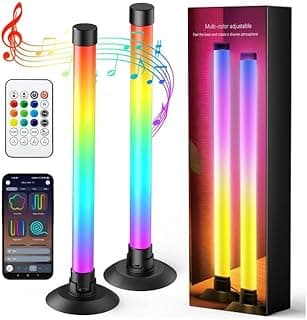
LED Light Bar with Music Sync
A budget-friendly RGB light bar with app and remote control for immersive TV backlighting.
- Music sync mode
- App & remote control
- USB powered
Pros
- Under $10 price
- App and remote control
- Music sync works well
Cons
- Lower build quality
- Fewer color options
- No voice control
This is perfect for beginners who want to try ambient lighting before committing to premium options.
Best LED Strip: Govee RGBIC Gaming Lights
For wall-mounted ambient lighting behind your desk, the Govee RGBIC Gaming Lights neon rope light excels. The 10-foot length wraps around desk edges or mounts on walls behind your setup.
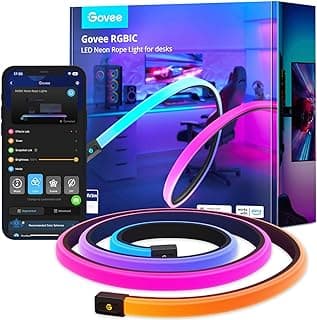
Govee RGBIC Gaming Lights
10-foot neon rope lights that sync with Razer Chroma for customizable gaming ambiance.
- 10ft length
- Razer Chroma sync
- App control
Perfect for:
- Razer Chroma sync if you have compatible Razer peripherals
- Custom cuts let you size it exactly to your space
- App control with scene creation and scheduling timers
The neon effect creates softer ambient glow compared to standard LED strips. Mounting hardware is included in the box.
Monitor Light Bar: RGB Monitor Light Bar
A monitor light bar sits on top of your display, providing directed light for your keyboard and desk area while reducing screen glare. The RGB Monitor Light Bar offers 9 modes at a budget price.
RGB Monitor Light Bar
Eye-care dual light reading screen lamp with 9 modes for computer desks.
- Eye-care dual light
- 9 modes
- 15.75 inches long
This is more functional than decorative. It actually illuminates your keyboard and desk surface while being designed to not reflect on your screen.
Shop Govee RGB Light BarsHow to Choose Ambient Lighting
Consider these factors before buying:
Placement: Light bars go behind monitors. LED strips can wrap around desk edges or mount on walls. Monitor light bars sit on top of displays.
Control: Premium options offer app control, voice assistants, and music sync. Budget options typically use physical buttons or basic remotes.
Ecosystem: If you have Razer gear, look for Chroma-compatible lights. If you use Alexa or Google Assistant, ensure compatibility.
Power: Most connect via USB (5V) or included power adapters. USB-powered options are easier to manage with a powered hub or gaming monitor USB port.
Our Verdict
Govee RGBIC Gaming Light Bars
These light bars deliver the best combination of features, brightness, and smart home integration. The 60+ scene modes and voice control make them the most versatile ambient lighting for gaming desks.
Check Price on AmazonFor budget-conscious buyers, the Govee Smart LED Light Bars at $49.99 deliver excellent value with nearly all the premium features. If you want Razer Chroma integration for your full setup, the Govee RGBIC Gaming Lights at $74.99 are the way to go.
Frequently Asked Questions
Does ambient lighting help with gaming? Ambient lighting reduces eye strain during long sessions by providing indirect light rather than relying solely on harsh overhead lighting. It also creates an immersive atmosphere that many gamers prefer.
Can I sync ambient lighting with games? Some premium options like Govee and Razer Chroma products can react to screen content or in-game events, though this requires specific software and compatible games.
Do I need smart home integration? No. Many ambient lighting options work standalone with physical buttons or basic remotes. Smart features add convenience but aren't required for good lighting.
Where should I place light bars? Most gamers place light bars behind monitors, reflecting off the wall for indirect ambient glow. You can also place them on desk edges or under shelves for different effects.
View All Recommended ProductsFor more desk setup improvements, check out our gaming mouse pad guide and headset stand recommendations to complete your battle station.
Ryan Torres
AuthorCompetitive FPS player (Immortal in Valorant) and former esports tournament organizer. Has tested 200+ peripherals over 8 years. Measures real-world tracking accuracy, surface consistency, and durability — not just specs on a box.
Related Articles
Best Gaming Desk Cup Holders 2026: 5 Clamp-On Picks to Prevent Spills
Five gaming desk cup holders compared. Anti-spill clamp-on designs from $13 to $27, rated on cup capacity, grip stability, and multi-function value.
Best Clamp Under Desk Trays for Gaming Desks 2026
Compare the best clamp under desk trays for gaming desks in 2026. No-drill metal trays rated by capacity, desk compatibility, load strength, and 12k+ customer reviews for clean cable setups.
Best Cable Management for Gaming Desks 2026
Comparing 6 cable management solutions for gaming setups. Find the best raceway, sleeves, and clips for your desk.